Aptos Token and Digital Asset are two Aptos standards for Non-Fungible Token standard on Aptos. To understand the difference between these two standards, you can refer to our article on Aptos token standards.
A Token or Digital Asset page is where data of a token/non-fungible asset is displayed for Aptos users’ reference. To understand this page, we will break down and go through it in two different sections: (A) Token details and (B) Activity.
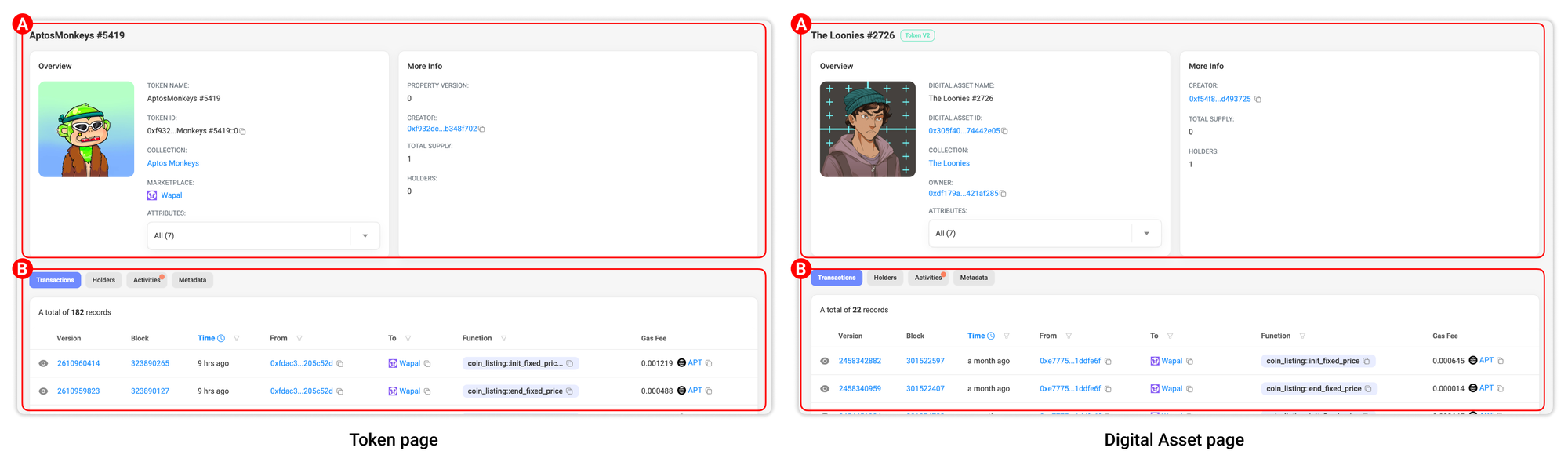

Section A: Token details
1. General information: The token name will be displayed at the top of the page. If the token you are seeing is a Digital Asset type, a ‘Token V2’ tag will be included to indicate that.
2. Overview: This part will provide information about the token market details, including:
a. Token Name/Digital Asset name: The token/digital asset name.
b. Token ID/Digital Asset ID: This shows the token address. You can quickly copy the address of the token using the copy icon function here.
c. Collection: The token/digital asset collection name is displayed here. You can quickly go the Collection page by clicking on the name.
d1. Marketplace (for Token type): The marketplace(s) where token is transacted.
d2. Owner (for Digital Asset type): Also known as the holder of that digital asset NFT.
e. Attributes: The dropdown list will display the token’s attributes, or traits, defining within the metadata of a collection or individual NFT, allowing for unique qualities and properties to be assigned to digital assets.
3. More info:
f. Property Version (for Token type): The version of the token’s properties.
g. Creator: The wallet address that created this token.
h. Total Supply: The total number of tokens that are actively in circulation and available for trading in the open market.
i. Holders: The number of wallet addresses that hold the token.

Section B: Activity
1. Transactions: This tab shows all token’s transactions fetched on-chain in realtime.
2. Holders: This tab shows the wallet address holding the token.
3. Activities: This tab shows all token’s indexed activities in chronological order from the latest. Basic information such as Action, Price, From and To wallet address, Marketplace and (Transaction) Version will be displayed here.
4. Metadata: This tab shows the token’s on-chain metadata.