The Token Market page on Solscan provides a detailed view of a specific token trading pair on Solana. It brings together the pool’s token balances, liquidity, trading volume, price chart, on-chain activity, liquidity positions, and decoded account data.
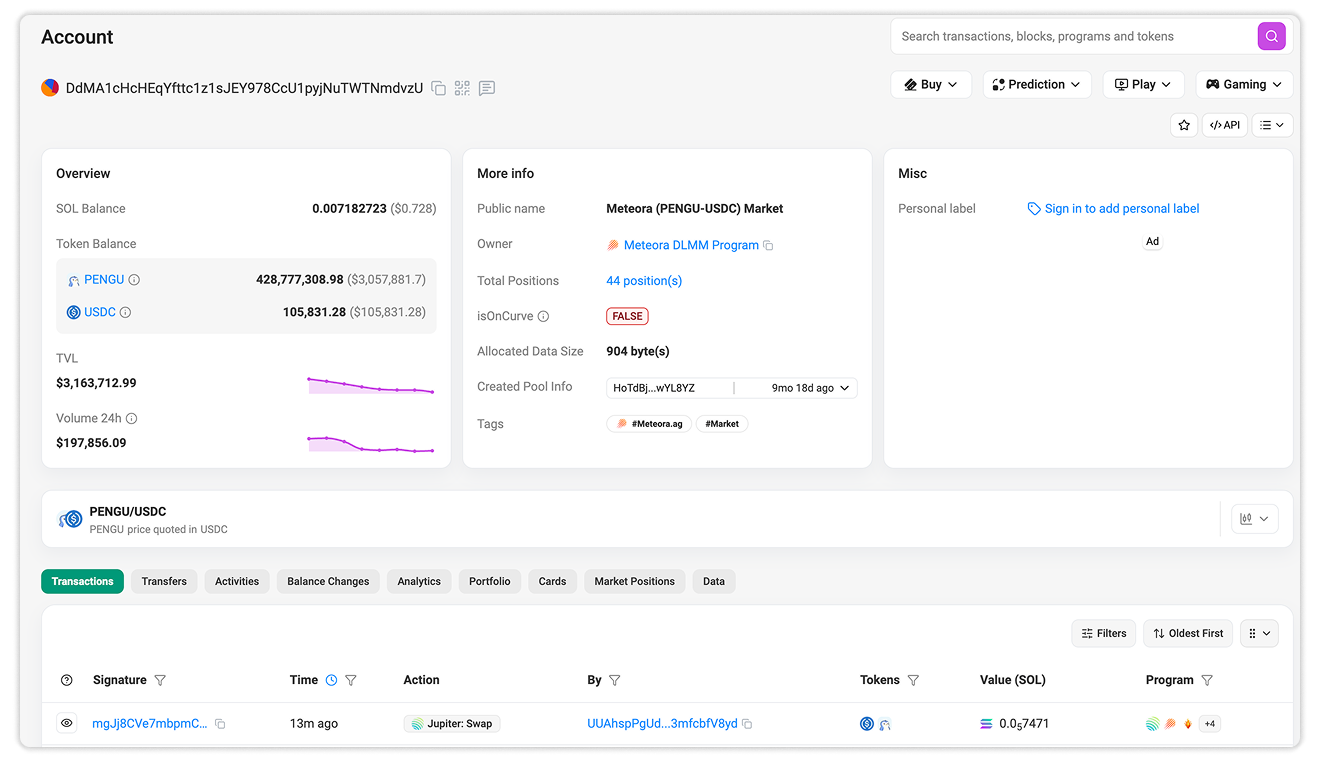
The page represents one specific pool rather than the entire market for either token. The same token pair may trade through multiple pools or AMM platforms, with each pool using a different address.
There are two ways to access this page:
- Enter the pool address into the Solscan search bar.
- Open a token’s Token Details page, navigate to the Markets tab, and select the address of the relevant market.
For example, the PENGU Markets tab lists the pools associated with PENGU. Selecting the Meteora PENGU-USDC market opens its Market AMM Account page.
Section A: General Information
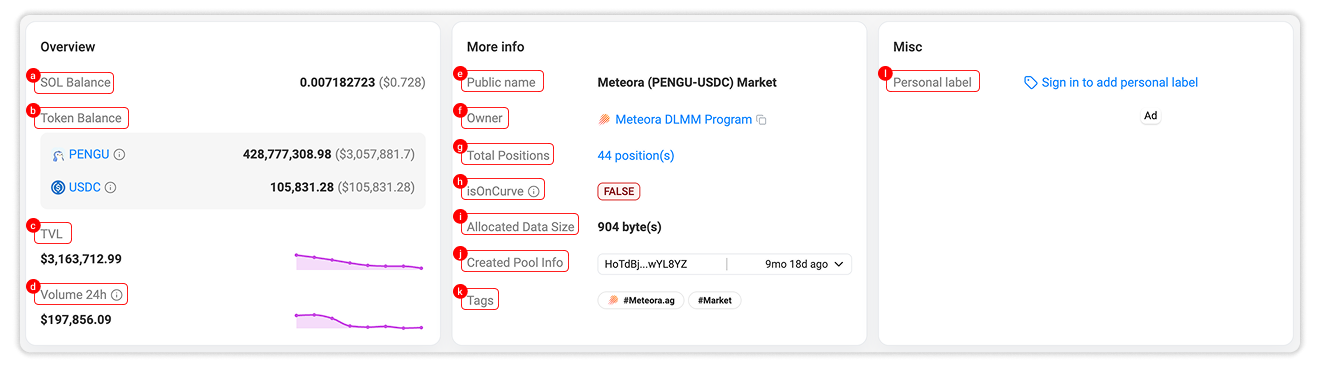
The upper section summarizes the market account, its balances, liquidity, ownership, and other on-chain attributes.
1. Overview
The Overview section includes:
a. SOL Balance: The amount of native SOL held by the market account and its estimated value in USD.
b. Token Balance: The balances of the two main tokens held by the pool. Each token name links to its corresponding Token Details page.
These balances represent tokens held by accounts associated with the market. Their composition generally changes as users trade or manage liquidity.
c. TVL: The estimated Total Value Locked in the market. This represents the combined value of assets currently associated with the pool.
d. Volume 24h: The total trading volume recorded through the market over the previous 24 hours.
The small charts beside TVL and 24-hour volume provide a quick view of their recent movement.
2. More Info
The More Info section provides additional information about the market account:
e. Public Name: A human-readable market label assigned by Solscan when available. It commonly identifies the AMM platform and token pair.
f. Owner: The Solana program that owns and manages the market account. Selecting it opens the corresponding Program page.
g. Total Positions: The number of liquidity positions associated with the market. Select the value to open the Market Positions tab.
h. isOnCurve: Indicates whether the account address lies on the Ed25519 curve. A value of False means the address is off-curve and does not have a conventional private key. Market accounts are commonly program-controlled addresses.
i. Allocated Data Size: The amount of on-chain storage allocated to the account, measured in bytes.
j. Created Pool Info: Shows the address associated with creating the pool and when the pool was created.
k. Tags: Displays Solscan tags associated with the account, such as its AMM platform and market classification.
3. Misc
l. Personal Label: Signed-in users can assign a private custom label to the market address. Personal labels are visible only to the user who created them.
Section B: OHLCV Price Chart
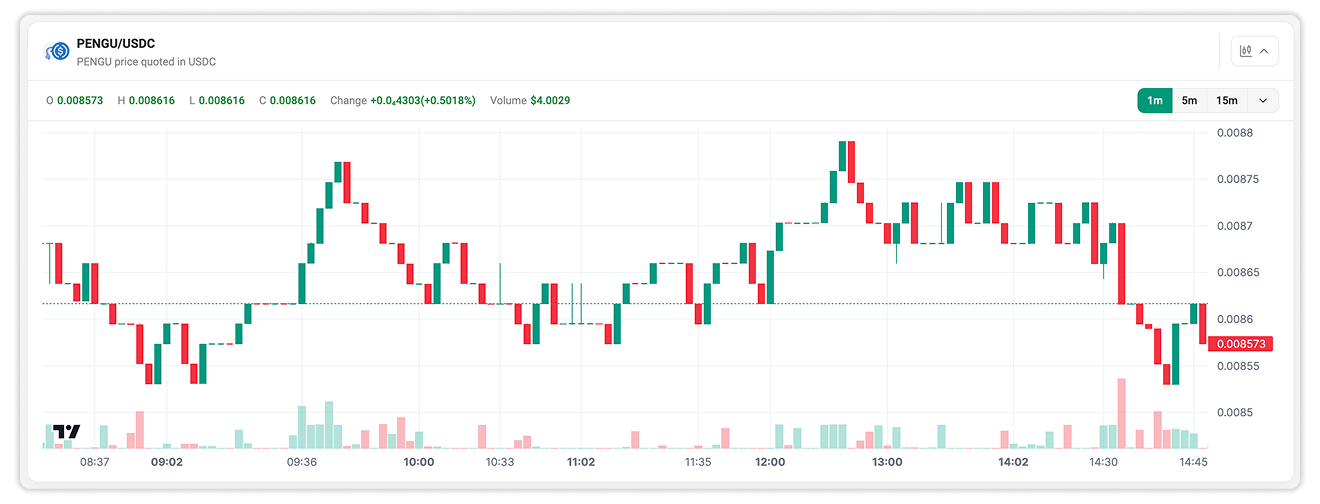
The OHLCV chart displays price and trading volume for the selected token pair. The chart header identifies the pair and shows which token is used to quote the displayed price.
For each selected interval, the chart provides:
- Open: The first recorded price
- High: The highest recorded price
- Low: The lowest recorded price
- Close: The final recorded price
- Change: The difference between the opening and closing prices
- Volume: The trading volume recorded during the interval
Use the interval controls to switch between timeframes such as 1 minute, 5 minutes, and 15 minutes. Additional intervals are available from the dropdown menu.
The chart represents trading activity from the selected market account. It does not combine data from every pool where the same tokens are traded.
For more information on candlesticks, volume, quote currencies, and chart intervals, refer to OHLCV chart guide on Solscan.
Section C: Details
The lower section provides separate tabs for examining the market’s transactions, asset movements, analytics, liquidity positions, and account data.
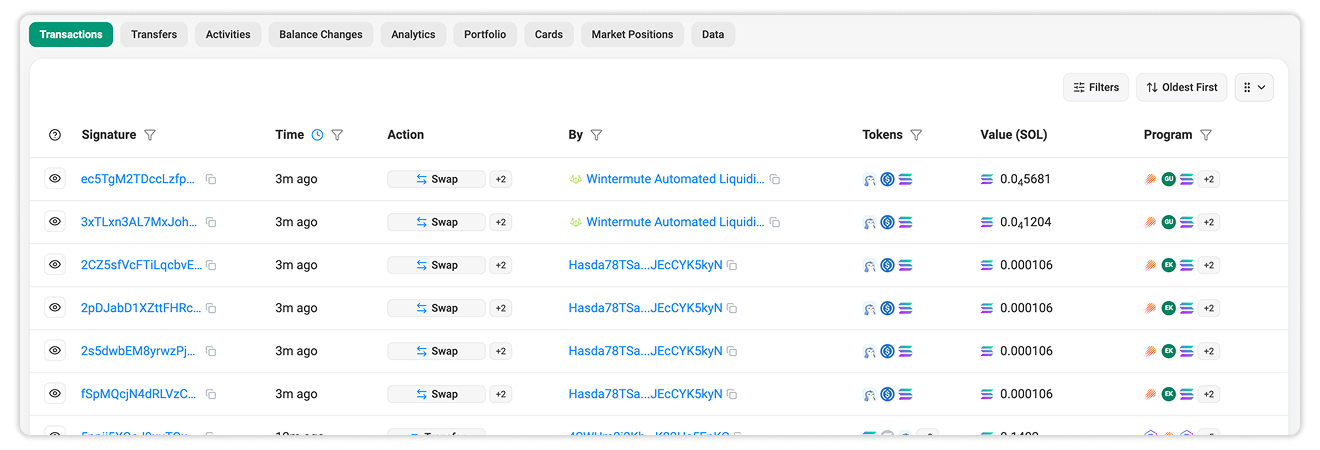
1. Transactions
The Transactions tab provides a real-time list of transactions involving the market account, including their signatures, execution times, actions, initiating accounts, tokens, values, and programs.
2. Transfers
The Transfers tab displays token transfers into and out of the market account, with filters, data visualization, and CSV export available for further analysis.
3. Activities
The Activities tab presents supported DeFi activity in a readable format, including swaps, participating accounts, exchanged amounts, rates, values, and programs.
4. Balance Changes
The Balance Changes tab shows how each transaction changed the balances of token accounts associated with the market, including the amount changed and resulting post-transaction balance.
5. Analytics
The Analytics tab aggregates activity associated with the market account. It includes separate views such as Overview, Transfers Heatmap, and Markets.
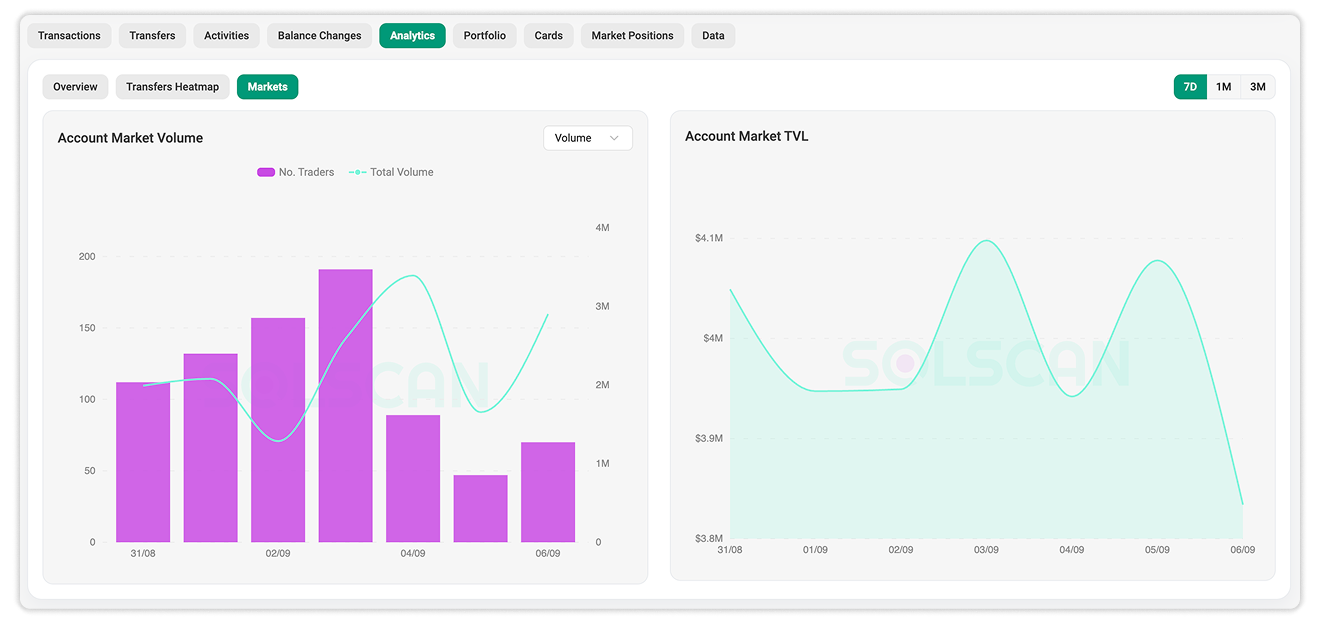
The Markets view provides two main charts:
a. Account Market Volume: Compares market participation and trading volume over time. In the displayed view, bars represent the number of traders while the line represents total volume.
b. Account Market TVL: Tracks changes in the market’s estimated Total Value Locked over time.
Users can switch between 7D, 1M, and 3M periods to examine short- and longer-term changes.
These charts help distinguish between different aspects of pool activity. For example, higher volume may result from broader trader participation or from a smaller number of high-value trades.
6. Portfolio
The Portfolio tab shows the assets held by the market account and separates them into Tokens, Positions, NFTs, and Domains where applicable.
For an AMM account, the primary pool assets normally represent most of the portfolio. Other tokens may also appear if they were transferred to the address independently.
7. Cards
The Cards tab displays additional services or account-related tools available through Solscan integrations, such as checking eligible airdrops or reclaimable SOL.
These cards are not part of the market’s trading or liquidity data.
8. Market Positions
The Market Positions tab provides a dedicated view of liquidity positions associated with the pool. For concentrated-liquidity or bin-based AMMs, liquidity can be distributed across individual positions instead of being represented only by one combined pool balance.
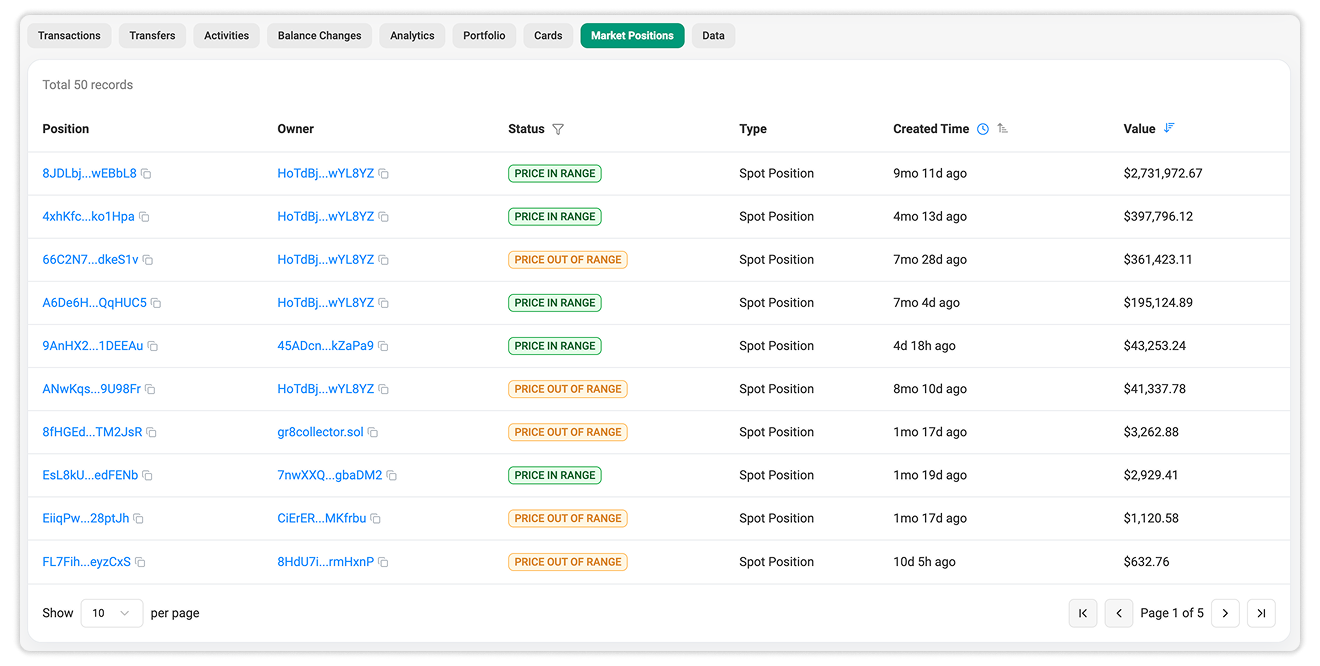
The tab includes the following fields:
a. Position: The on-chain address that identifies the liquidity position. Select it to inspect the position account on Solscan.
b. Owner: The address associated with the position. Selecting the address opens its Account Details page.
c. Status: Indicates whether the position is currently active relative to the market price.
- Price in Range: The current market price falls within the position’s configured liquidity range.
- Price Out of Range: The market price is outside that range.
When a position is out of range, its liquidity may no longer be actively used for trades at the current price. This does not necessarily mean the position has been closed or has no assets.
d. Type: Shows the position category recognized by Solscan. In the example market, positions are displayed as Spot Position.
e. Created Time: Shows when the position was created. The column can be sorted to review newer or older positions.
f. Value: Shows the estimated current value of the assets associated with the position. Users can sort this column to identify the largest positions in the market.
The Total Positions value in the More Info section links directly to this tab.
Position structure and status depend on the AMM’s design. Not every liquidity protocol uses concentrated ranges or exposes the same position information.
9. Data
The Data tab displays the raw state stored in the market account.
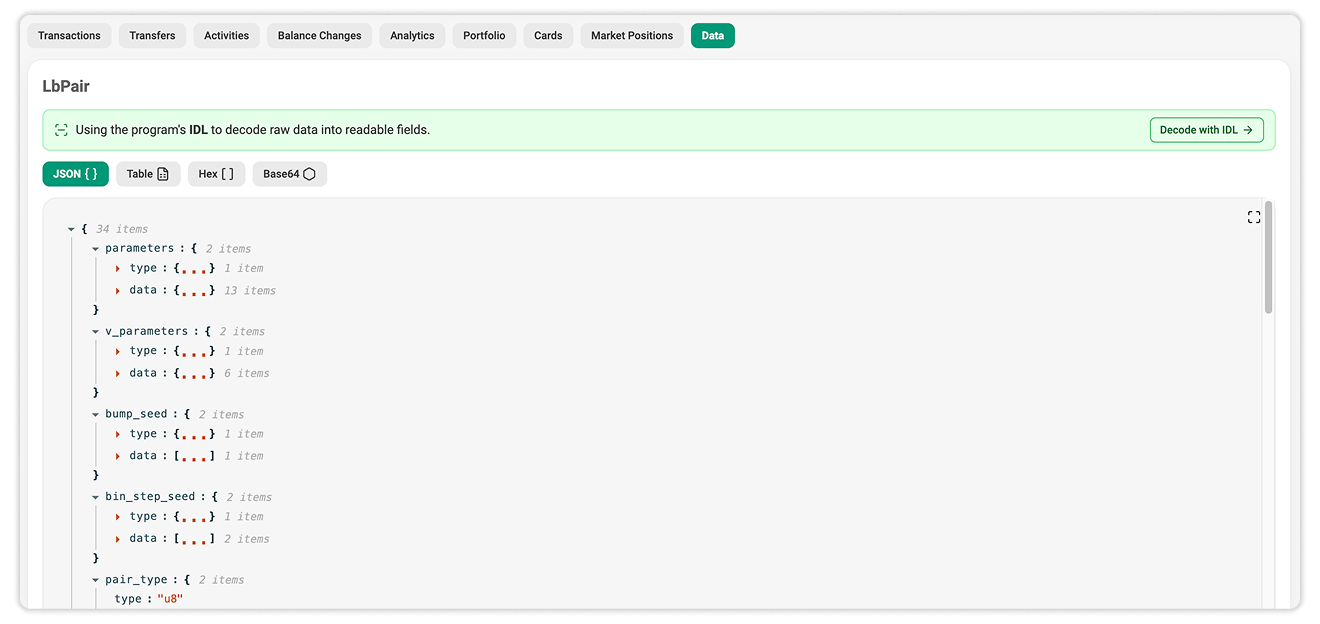
When Solscan can access the program’s Interface Definition Language, or IDL, it decodes the raw bytes into readable account fields. Users can view the data in several formats such as JSON, Hex, Base64, or Table format.
The decoded output may contain parameters related to the pool’s configuration, token reserves, price bins, fees, seeds, authorities, or other program-specific state.
Select Decode with IDL to open the IDL Account Data Decoder for further inspection.
The meaning and structure of these fields are defined by the program that owns the market account. They therefore differ between AMM platforms and account types.